- A Roadmap To CRA Compliance and Financial Stability
- Navigating Change
- Resilient Self-Employed Finances
- Solo CRA-Ready Workflow
Solo CRA-Ready Workflow: Gather, Process, Results

By L.Kenway BComm CPB Retired
This is the year you get all your ducks in a row! Start by starting ... and keep it simple. Consistency beats perfection.
Published May 16, 2026 | Revised May 21, 2026
WHAT’S IN THIS ARTICLE
Two Ways In | The Three-Step Cycle | Step 1: Gather | Step 2: Process | Step 3: Results Delivered | Monthly or Quarterly | Your Cycle at a Glance | What One Complete Cycle Produces | Complete Workflow Map | Solo CEO Move | Acronyms Used
BACK TO >> Build Financial Resilience
RELATED >> 30-Day CRA Admin Reset | How Cloud Bookkeeping Works | Results Delivered | Your Tech Stack | CRA-Grade Records System
 3 Step Cycle: Gather → Process → Results Delivered
Two Ways In
 You are at the 4th rest stop on the journey to Managing Uncertainty.
Welcome to the Building Resilience Rest Stop!
If you are self-employed in Canada, Canada Revenue Agency (CRA) is a fact of life. Maybe you found this article after completing the 30-Day CRA Admin Reset (Reset). You built the habits, got your Admin Inbox under control, and worked through five steps (capture, categorize, reconcile, review, retain) until they started to feel like a routine.
Or maybe you’ve been running your own books for a while, you have a working system of some kind, and you’re here because you want to see if there is another way.
Either way, you’re in the right place.
This article shows you the practitioner’s view of your back office ... the same workflow a professional bookkeeper used, scaled to a one-person business. Three steps. Repeatable every period. Designed to close the loop rather than just keep up.
This article is not a CRA filing guide, a deductions reference, or a year-end checklist. For year-end preparation, see Getting Ready For Year-End on my companion site. Everything else links out where it's relevant. This page gives you the repeatable back-office cycle that makes all of those other tasks easier when the time comes.
If you came from the Reset, you already know all five steps of this cycle. You just haven’t seen the full picture yet. More on that in a moment.
If you haven’t done the Reset and your books are behind or disorganized, it’s worth starting there before coming back here. The Reset builds the foundation this cycle runs on.
We’ll follow Alex through one month to show you what this cycle looks like in practice. Alex is a freelance web designer with three regular clients, the occasional one-off project, simple books.
January is a typical month: three retainer invoices, two project invoices including a 50% deposit on a new website build, a handful of recurring subscriptions, a few one-offs. For this example I've chosen LedgerDocs as the document management system (DMS) to handle document collection and sync with QBO (QuickBooks Online) as the bookkeeping platform. Finalized records and longer-term files are archived in Google Drive (or OneDrive) for permanent cloud storage.
I'm going to assume Alex is Alberta based and is registered for GST. Alex does all the work and does not use subcontractors or have an employee.
The Three-Step Cycle
 Flowchart of 3-step solo bookkeeping cycle: Gather, Process, Results Delivered
Every professional back office, regardless of the size of the business, runs the same basic cycle:
Gather → Process → Results Delivered
That’s it. Three steps, run consistently at the close of every period, and your books stay current, your records stay portable (keeps CRA happy which is important), and your year-end stops being a project you dread.
What's been changing over the past twenty years are the tools, not the process. Some of the technology required adjustment to the workflow, especially when transitioning from paper to digital records, but the process for the most part stayed the same.
Here’s what each step contains. If you completed the Reset, I'll let you know where your five steps land in this process.
Step 1: Gather
Reset step: Capture
 Gather step detail - four document sources feeding into a DMS inbox
Gather is everything that happens before you open your bookkeeping software as depicted in the flowchart above. Its job is simple: get every source document ... every receipt, invoice, bill, statement, and contract ... into one place so nothing gets processed from bank and credit card statements and nothing gets lost.
What belongs in Gather
- Receipts - physical and/or digital, from every purchase
- Sales invoices issued to clients
- Bills and supplier invoices received
- Bank and credit card statements downloaded from your financial institution
- Contracts, agreements, or any document that supports a transaction
The capture discipline
One inbox. Everything goes there first. The rule is the same regardless of what that inbox looks like ... one place, captured at the time, not reconstructed later.
The weakest Gather systems are the ones where documents live in multiple places and get processed from wherever they happen to be. That’s how receipts disappear and invoice trails go missing.
A note on document management systems
In this day and age where source documents come from multiple places, not just the postman, it's harder to keep track of the paperwork. A dedicated document management system (DMS) makes Gather significantly more reliable than a folder or email inbox alone in today's paperless environment. DMS are digital filing cabinets that help you automate your paperwork. LedgerDocs is a good Canadian DMS example. It's affordable, and built around a workflow that mirrors the traditional paper-based bookkeeping flow that accountants refined over decades. That familiarity keeps the learning curve low.
LedgerDocs gives you multiple ways to get documents into 'the inbox' ... mobile capture, email forwarding, scanning, direct upload. If your business receives supplier bills or client documents by email, you can set up an auto-forward rule so they land in your LedgerDocs inbox without a manual step. That’s Gather running on autopilot for a whole category of documents.
LedgerDocs has its own built-in folder architecture and file naming system, which is efficient and worth using inside the app. That naming system is not the same as the YYYY-MM convention I've suggested you use for your permanent archive outside the app. Two different environments, two different naming systems. Both consistent within their own context.
In QBO's case, it has a Document Centre within QBO but it is not as robust as independent DMS solutions. It has basic functionality to attach receipt images or supplier bills to specific transactions only.
READ MORE >> CRA-Grade Records System
Automation belongs in Gather
Email auto-forwarding, mobile capture habits, and scanner routing all belong here. Automation doesn’t replace the discipline. It reduces the friction so the discipline holds.
A word on statement fetching:
Some DMS tools and SaaS (software as a service) bookkeeping platforms offer bank and credit card statement fetching (or extraction) - the app pulls your statements automatically from your financial institution. It sometimes is available at an extra cost.
When bank statement fetching first came out, I loved it. I used HubDoc to fetch my utility bills as well as my bank and credit card statements. I stopped using the feature due to friction. As the bank made security changes, the fetching links kept breaking. I found it easier to just diarize the task so that on a certain day, I'd go grab my statements.
I don't know how much friction exists today, so you'd have to test the feature if it appeals to you. Personally, I can't wait for open banking so I can once again hopefully automate this task.
Sidebar: Xero acquired HubDoc in 2017, and statement and supplier bills fetching in that ecosystem runs through HubDoc. QBO has its own fetching capability as well but I stopped using it as Intuit kept changing it. I did not like having only one place holding my documents. Fetching (or extraction) functions are separate from the bank feed function, which has a different purpose ... bank feeds pull transaction data into the platform for reconciliation, not the third-party statement documents themselves.
For now, just know you have options. Until open banking is up and running in Canada, my preference is to download my own bank, credit card, utility statements directly from my financial institution at period-end. I upload them to LedgerDocs and file them in a cloud storage digital folder as well.
Your statements are not your banking transaction history
When you log into your online banking and print a list of transactions in your account, you are printing a view (a snapshot) that your bank generated on demand. A downloaded monthly PDF statement is different. It is a formal record issued by your financial institution for a specific period, with an opening balance, a closing balance, and every transaction in between. Accountants, bookkeepers, bankers, and auditors recognize the distinction. A bank-issued (or any third-party-issued) statement is a third-party document that exists independently of anything you produced. A printed transaction list is not. A third-party sourced document provides independent, objective verification your internal reporting is accurate.
The CRA standard
CRA requires source documents to support every business transaction. A transaction in your bookkeeping platform without an attached source document is a record with a gap. Gather is where you prevent that gap from forming.
Alex’s January Gather inbox contained three retainer invoices issued to regular clients (all including GST where applicable), one deposit invoice for the new website project, one project brief and signed contract from that same client. A Canva Pro receipt and a hosting renewal receipt were forwarded automatically from email into LedgerDocs. Most recurring SaaS expenses include GST and are coded automatically in QBO. Bank and credit card statements are downloaded on the sixth business day of the following month.
Alex tried to automate as much as possible as bookkeeping isn't a favorite task. Most of the recurring services are set up as pre-authorized payments (PAP) whenever possible. Alex uses a dedicated business credit card and PayPal business account for the PAP to reduce manual admin work.
Everything in one place before the software opened. No hunting for source documents or pulling everything together from multiple places has been a game changer for Alex. That’s Gather working.
Step 2: Process
Reset steps: Categorize + Reconcile
During the 30-Day CRA Admin Reset, I did not explicitly introduce attaching source documents in the affordable tech option. I introduce it here.
Jump To >> Categorize | Attach | Reconcile
 Process step detail - categorize in DMS then push to QBO and reconcile
Process, as depicted in the detailed flowchart above, is where gathered documents become bookkeeping entries. It has three parts that belong together as one workflow step, not three separate tasks you do on different days.
If you are new to bookkeeping software, check out How Cloud Bookkeeping Software Works before you dive in. It is a blueprint of how the platformed is structured. You may find it helpful to have it open in a separate window so you can refer to it as you read this part of the cycle.
Categorize
Every transaction gets assigned to the correct account in your chart of accounts. For self-employed Canadians, that means categories that align with your T2125 ... the tax form where your business income and expenses are reported. Categorizing to a chart of accounts that doesn’t map to T2125 creates friction at year-end that doesn't need to exist as you are a small business.
Consistency matters more than perfection here. A consistently applied imperfect category is easier to reclassify at year-end than a different posting decision every month. My line-by-line T2125 guide can help you determine the best place to code items when you are unsure.
How LedgerDocs bridges Gather and Process
This is where LedgerDocs (LD) earns its place in the workflow. Once a document lands in your LD inbox, it performs a key-field OCR (optical character recognition) extraction. It captures the supplier name, date, total, subtotal, and tax breakdowns. Then it uses AI (artificial intelligence) and any rules you have setup to automatically format and categorize the data. LD leaves the original source document attached alongside suggested inputs, giving you control to review and override fields if needed. File naming happens at this point too. LD applies its standardized naming convention in the Rename field when you send the document. It doesn't overwrite the file name from the original upload unless you hit the Rename button. If you want to retain your original file name and use the LD naming format, you can do so by doing a copy-paste into the notes section if it isn't there already.
For suppliers you use regularly, LedgerDocs lets you set up auto-categorization rules ... mapping a specific supplier directly to the account it always belongs to. Once the rule exists, that supplier's documents are categorized automatically on arrival. You still review before sending, but the decision LD makes reduces your decision fatigue. If you aren't into setting up rules, LD remembers what you posted the last time and pre-fills using that data. For a solopreneur with consistent recurring expenses, either option is a meaningful time-saver.
Because LedgerDocs syncs with QBO, your QBO chart of accounts shows as a dropdown during coding in LD. If you don’t like the OCR suggestion for the category, you choose from your own accounts directly. When you hit send, LedgerDocs pushes the transaction to QBO and attaches the source document to the QBO transaction automatically.
That single action ... hitting send to publish it to QBO ... does three things at once: categorizes the transaction, attaches the source document, and posts it to your QBO books. The document now lives in three places: wherever it originated, LedgerDocs, and QBO with the attachment. That redundancy matters. You’ll see why when you get to the CRA-Grade Records System.
Here’s what Alex’s Process looked like for a few January transactions.
The Canva Pro charge arrived in LedgerDocs via auto-forward from the billing email. LedgerDocs extracted the supplier name, date, total in USD, and the tax breakdown. Alex had already set up an auto-categorization rule for Canva, mapping it directly to Dues & Subscriptions (or Management and Admin Fees is also a good choice), so the coding appeared automatically every time.
Alex reviewed the suggested fields, made one small change, and hit send. In one action, the transaction was categorized, the entry was posted into QBO and the source document attached automatically.
Because the charge was a USD transaction, one additional step remained. LedgerDocs posted the USD amount only, without exchange-rate detail, to QBO. So Alex located and opened the transaction in QBO, added the exchange rate information, and saved the edit. With both applications open side-by-side, the adjustment took only a few seconds ... a quick two-step: send from LD, update exchange info in QBO.
The hosting charge required even less work. It had already been created automatically as a recurring transaction in QBO ... same supplier, same CAD amount, same account coding every month. Alex had attached the original January invoice to the recurring template at the start of the year. So for February and March the only remaining task was entering each month's invoice number from the bills sitting in LedgerDocs. No decision required just a bit of editing. Once update, the documents were tagged as posted in LD and filed away. Again easy to do as the applications were open side-by-side.
The deposit invoice for the new website project was posted to Customer Deposits rather than revenue as it has not been earned yet. The remaining balance, due on project completion in February, sat open in Accounts Receivable at January month-end. Alex noted it and moved on.
Attach
Every transaction gets its source document attached before you move on. Not later. Not at year-end. At the time of posting.
This is the step most solopreneurs skip or defer, and it’s the one that costs the most when CRA asks questions. An attached document turns a line in your GL (general ledger) into a defensible record. Without it, you have a number with no proof.
If you are not using a DMS that handles attachment automatically, do it manually in your bookkeeping software before you close the transaction. QBO supports document attachment on every transaction. Use it.
CRA-Ready Tips: Three Things That Are Not The Same
Self-employed workers often treat these three things as interchangeable. They're not, and the difference matters when CRA asks questions.
- Your DMS is not your bookkeeping platform
A document management system (DMS) holds your source documents ... receipts, invoices, bills, statements, and contracts and agreements. It is your online filing cabinet.Your bookkeeping platform holds your financial records. The two work together, but they serve different purposes. A transaction in your books without an attached source document is a record with a gap. - Bank feeds do not replace source documents
Bank feeds pull transaction data from your financial institution and speed up data entry. They show that money moved. They do not prove what was purchased, whether the expense was business-related, or whether GST/HST was properly supported. Record from your source document first. Use bank feeds to match EXISTING entries, catch missing transactions or bank originated transactions (like bank fees, interest, charge backs), and monitor cash activity. They should not act as your primary record. - Clearing bank feeds is not a formal account reconciliation
Reconciling an account means comparing your accounting records to the official bank or credit card statement ... the period-end document issued by your financial institution that you need to download ... and confirming that every transaction is complete, accurate, and properly recorded. Categorizing downloaded transactions is a step inside Process. Reconciling accounts is the verification that closes it.
See also >> How Cloud Bookkeeping Software Works. It is a visual map of how these pieces connect inside your bookkeeping platform.
Reconcile Accounts
Your bank feeds in your bookkeeping platform get matched to your bank and credit card statements until they agree to the penny. Every period. No exceptions. This does not mean coding everything to 'miscellaneous' or 'other' to make it match.
Reconciliation is your proof that what’s in your books reflects what actually moved through your accounts. It catches errors, duplicate entries, missed transactions, and bank errors before they compound. A reconciled set of books is a defensible set of books. An unreconciled set is not.
Here's a quick reminder from Reset of what a formal reconciliation look like:
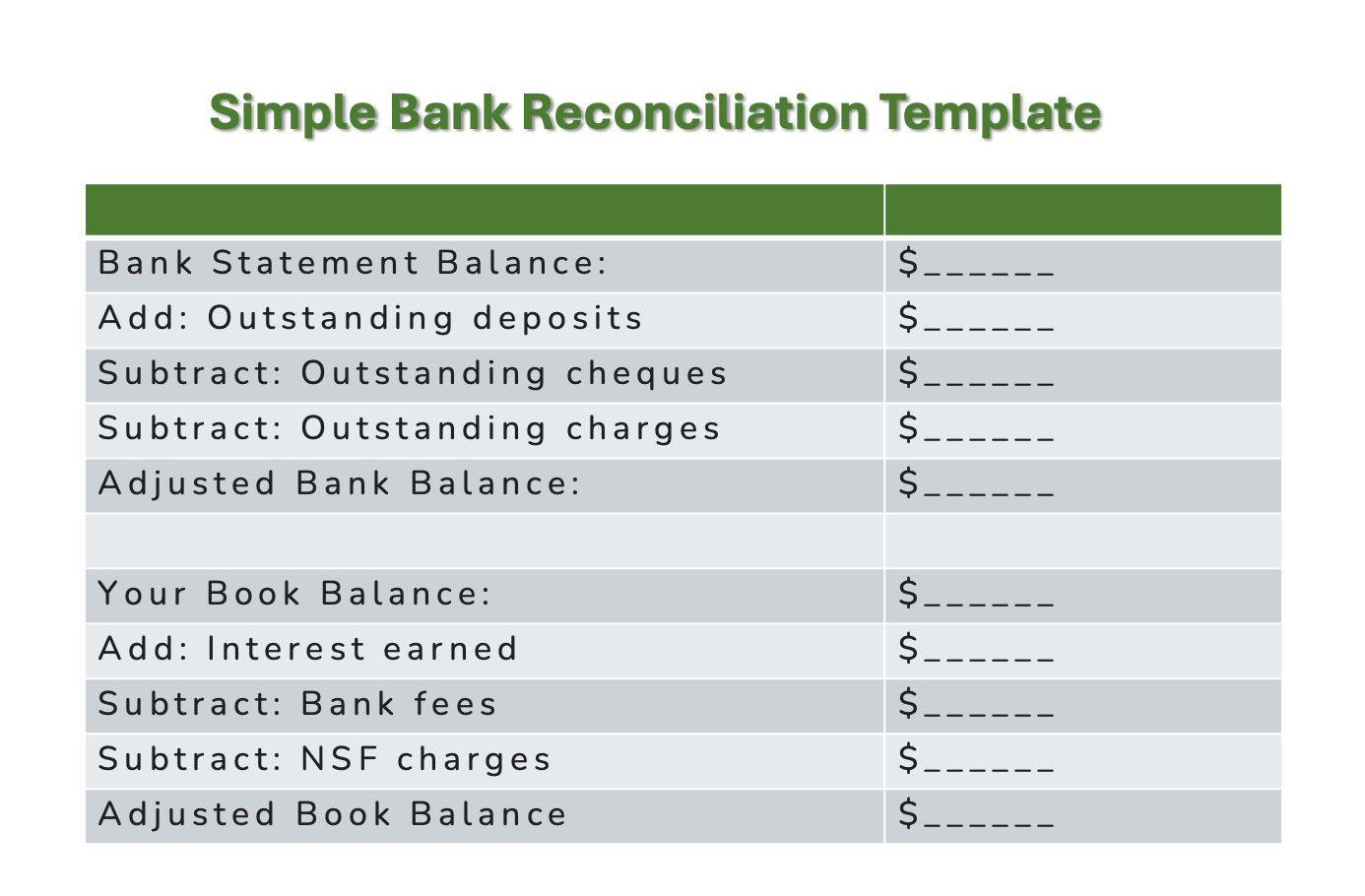 What a formal bank reconciliation report looks like
Reconcile each business account separately ... business chequing, savings if used for business, every business credit card. QBO produces a reconciliation report when you complete each reconciliation. Download it in PDF format and file it separately as part of your Process records.
Having a formal reconciliation report has saved my bacon a few times when closed prior periods get changed and I need to look at what happened when. QBO shows you what entries changed if a reconciled opening balance was altered but sometimes it helps to see it the bank rec.
Reconciliation runs on the same cycle as your period-end close (see step 3). It is the last action in the Process before you move to Results Delivered. Think of it as the handoff check - books verified, variances resolved, statements matched. Only then does the period-end close package mean what it says.
Alex reconciles monthly even though a quarterly close was chosen. It wasn’t always that way. The first year running a quarterly close, Alex waited until March to reconcile all three months at once. A client payment had been applied to the wrong invoice in January, creating an accounts receivable discrepancy that had quietly compounded for eleven weeks before anyone noticed. The fix took an afternoon.
Now Alex reconciles every month-end instead. It adds maybe thirty minutes to Money Monday once a month, but the tradeoff is worth it ... problems get caught early while they’re still small and easy to fix.
January’s reconciliation was clean. The Canva Pro payment cleared against the statement, the deposit payment matched correctly, and the hosting payment reconciled without adjustment. The books balanced to the penny.
Alex is noticing something else ... each month the reconciliation process gets a little faster. Once transactions are consistently categorized, source documents are attached properly, and recurring entries are automated, reconciliation becomes less about detective work and more about verification.
Step 3: Results Delivered
Reset steps: Review + Retain
During the 30-Day CRA Admin Reset, I did not introduce creating a period-end closing package. I introduce it here.
 Results step detail - see the filing destinations including a DMS and Cloud storage
This is the step that most solopreneurs never complete ... not because it’s difficult, but because nobody told them it existed.
Review and retain, as the Reset framed them, are the beginning of this step. But Results Delivered goes further. It produces something: a period-end closing package that is portable, independent, and complete. The flowchart above shows you what, when, and where documents get saved.
What Results Delivered means in practice
At the close of every period, you produce a package of reports and documents that closes the books for that period. It goes into permanent storage outside your bookkeeping software. It is your record of what happened, in formats that will outlast any platform.
The package usually includes your financial statements, your aged AR (Accounts Receivable) and AP (Accounts Payable) listings, and your GL export in both PDF and CSV formats. In addition to that package, there are other reports you can archive such as your adjusted trial balance, your bank and credit card statements (if you didn't do this under Gather!), and a brief set of management notes that capture what the numbers showed and what you decided.
Why this step changes everything
Without Results Delivered, your books are a running record inside an app. With it, your books become a series of closed, portable, independently stored periods ... each one complete, each one findable without logging into anything.
That distinction matters when you want to switch software. It matters when your subscription lapses. It matters when CRA asks about a specific period three years prior. It matters when you hand your records to a tax preparer and they can work from what you’ve given them rather than pulling reports themselves.
For the full treatment of what the close package contains ... every report, every export (or download), the management notes format, and how to file and store it ... see Results Delivered (coming soon).
Alex doesn’t formally close the books in January. The quarterly close happens at the end of March. At each month-end, Alex formally reconciles the bank and credit card account in QBO against the downloaded third-party PDF statements. Once complete, the reconciliation report is exported in PDF format, uploaded into LedgerDocs for filing, and archived in Google Drive (or OneDrive). That’s the monthly discipline.
Alex also pulls a P&L (Profit and Loss statement) each month ... not to file it, but to have current numbers for Fundamentals Friday. Two tasks, thirty minutes, done.
The full close package gets produced at quarter-end (Q1, Q2, Q3, Q4) ... the P&L, balance sheet, aged AR showing the February receivable now cleared, aged AP if applicable, management notes for the quarter, and GL exports in both PDF and CSV format. The complete package is stored in LedgerDocs and a duplicate copy archived in Google Drive (or OneDrive).
Importantly, the close package lives outside the bookkeeping platform itself. Alex can find documents independently of QBO and answer a CRA question about a specific transaction without reconstructing anything from memory or going into the bookkeeping platform and opening every transaction manually.
February and March follow the same pattern. Documents land in the Gather inbox in real time as business happens ... receipts forwarded automatically, invoices sent to the inbox automatically from QBO, statements downloaded at month-end. Process runs on Money Mondays, working through whatever Gather collected that week.
Each month-end, Alex formally reconciles the bank and credit card accounts to the downloaded third-party PDF statements, files the PDF reconciliation report produced in QBO, and pulls an updated P&L for Fundamentals Friday. That’s it. No extra production work is required because the system is already maintaining itself.
By the time April arrives, three months of clean, reconciled, documented activity are ready to roll up into one quarterly close. The cycle has been running all along and the rhythm is established.
With the first quarter closed, Alex now has reconciled numbers ready for the mandatory GST filing. Because the business operated in Alberta, only federal GST applies. The quarterly GST return for January through March is prepared directly from the reconciled Q1 date in QBO after the March closing numbers are finalized.
Before filing with CRA, Alex exports four GST report from QBO. All reports are in PDF format:
- the GST Summary report,
- the GST Detail report,
- the GST Exception report, and
- the GST module filing report showing whether adjustments from prior filing periods exist.
Together, those reports provide both the filing numbers and the audit trail supporting them.
Alex reviews the GST collected on client invoices against the input tax credits (ITCs) captured from business expenses like hosting, software subscriptions, and contractor costs. Since the books were already reconciled, no additional cleanup is required before filing.
The GST return is submitted through the CRA portal in April, the payment scheduled electronically using CRA's preauthorized payment (PAP) scheduling service. The filing confirmation PDF and CRA PAP agreement are downloaded and saved in LD with an archived copy in Google Drive (or OneDrive).
The real outcome of the workflow ... when filing deadlines arrive, the numbers are already ready.
Monthly or Quarterly: Which Is Right for You
When does each step run?
- Gather: continuous, in real time, as documents arrive. Not a period-end task.
- Process: every Money Monday, without exception. Work through whatever Gather has collected that week.
- Results Delivered: monthly if your transaction volume is moderate or higher, or if you carry receivables. Quarterly only if Money Mondays are solid, Treasury Thursdays are running, and your business is genuinely simple.
- Reconciliation: matches your close frequency, with one exception: if you close quarterly, consider reconciling monthly as an early warning system. Alex learned this the hard way. A discrepancy caught in week two costs thirty minutes. The same discrepancy caught in week eleven costs an afternoon.
The close frequency is your decision. The weekly discipline is not optional regardless of which you choose. When you have a low volume of transactions, it is not wrong to reconcile your accounts quarterly. But if you want to establish early warning routines, then reconciling your accounts monthly helps with that objective.
This frequency question only applies to Step 3: Results Delivered. Steps 1 and 2 run weekly regardless as they are built into your Money Mondays routine. Gather and Process are not monthly or quarterly activities. The close is.
What you are deciding here is how often you close the books, reconcile, and produce your period-end reporting package.
Monthly close is the standard. It keeps your picture current, catches problems early, and means Fundamentals Friday always has complete data to work with, not just cash and Accounts Receivable visibility. You will be able to see your actual period income and expense trends.
If your business has a moderate transaction volume, carries receivables, or you need current income data to make pricing, spending, or client decisions, close monthly.
To recap. Run this cycle monthly if:
- Your transaction volume is moderate or higher.
- You carry receivables and need to watch aging.
- Your cash position needs regular visibility.
- You’re still building the habit and monthly keeps you honest.
Quarterly close is a legitimate alternative if three conditions are met:
- Your weekly habits are solid. Money Mondays are happening. Books are current. The Admin Inbox clears every week. A quarterly close only works if Gather and Process are running continuously. It is not permission to let things accumulate.
- Your cash management is working. Treasury Thursdays is happening, giving you weekly cash visibility. You are not flying blind between closes.
- Your business is genuinely simple. Low transaction volume, no employees, no inventory, no complex GST/HST situation.
If those three conditions are true, reconcile and produce your period-end reporting package quarterly as one aligned step. Reconciliation frequency should match your close frequency.
One thing to be clear-eyed about. A quarterly close means your numbers aren't formally reconciled and closed between final reporting packages. That said, if Money Mondays are running consistently, your books are current enough to pull a preliminary P&L at any point and make decisions from it with reasonable confidence. It just means the final, audit-ready picture arrives four times a year rather than twelve.
If you are not sure, start monthly. You can always move to quarterly once the habits are second nature.
Your Cycle at a Glance
Here's the full cycles mapped against the 30-Day Reset's five steps ... same workflow, two views:
| Three-Step Cycle | Reset's Five Steps | What It Does |
|---|---|---|
| Gather | Capture | Every source document into one inbox, at the time |
| Process | Categorize (+ Attach) |
T2125-aligned chart of accounts; Source document attached to every transaction before moving on |
| Process | Reconcile | Books matched to statements, to the penny, every period |
| Results Delivered | Review | Look at key numbers. Review your taxes and learn your cash rhythm, check industry and government news |
| Results Delivered | (Close +) Retain | Report package produced, exported, archived — period closed |
The 30-Day Reset built the habits. Results Delivered includes creating a reporting package that gets reviewed and archived. It's the step that closes the loop because it produces something you can keep, share, and defend.
Alex’s January maps cleanly to this table. Gather ran continuously. Process ran every Monday. The account reconciliations (recs) closed the month. The bank and credit card reconciliation reports and P&L were filed. The cycle ran. February and March did do the same. By the end of Q1, five steps fully executed, three months running.
What One Complete Cycle Produces
Every time you run Gather → Process → Results Delivered, you close the period with five things CRA can ask for and you can actually find.
| Workflow Step | What You Produce | CRA Purpose | When |
|---|---|---|---|
| Gather | Source documents in one inbox | Proves every transaction has third-party support | At the time |
| Process: Categorize | T2125-aligned GL entries | Maps expenses to the correct tax form | Weekly (Money Mondays) |
| Process: Attach | Document attached to every transaction | Turns a GL line into a defensible record | At time of posting |
| Process: Reconcile | Reconciliation report (PDF) | Proves books reflect actual account activity | Every period-end |
| Results Delivered | Period-end close package | Portable, independent record of each closed period | Monthly or quarterly |
Complete Workflow Map
This is how the whole process works using today's technology. I find an infographic can say a lot more than words sometimes.
Take a few minutes to orient yourself before you dive in. It'll make it everything else click faster. You'll want to bookmark this one to come back to it.
 Infographic depicting the 3 step CRA-ready workflow
🦆 Solo CEO Move
Map your current practice against the three steps.
Where does your system break down? Most solopreneurs are reasonably solid on Gather and Process ... documents land somewhere, transactions get posted. The gap is almost always Results Delivered. The period ends and nothing gets produced, exported, or filed. The books stay open inside the app indefinitely.
Pick one period ... last quarter or the last period you filed with CRA ... and close it properly. Run your reports, export your GL in PDF and CSV, pull your bank statements, write six lines of management notes, and file everything in one folder outside your software.
That is a closed period. Do it again for the next period. The cycle is not complicated. It just has to actually happen.
Alex did the CEO Move for the first quarter ... not perfectly. There were a few hiccups and that's okay. The open AR on the website project was a reminder that delivering a service and receiving payment often do not happen within one accounting period. But Gather ran, Process ran, the monthly recs got done, and the PDF reports got filed. The cycle ran. That’s the standard: not perfect, just consistent.
Acronyms Used
These are the acronyms used in this article. The Site Glossary is also a good place to lookup terms you don't understand.
AI - Artificial intelligence
AR - Accounts receivable
AP - Accounts payable
CAD - Canadian dollar
CRA - Canada Revenue Agency
CSV - Comma separated value file format
DMS - Document management system
GL - General Ledger
GST - Goods and services tax
HST - Harmonized sales tax
LD - LedgerDocs, a DMS
P&L - Profit and Loss financial statement
QBO - QuickBooks Online, a cloud based bookkeeping platform
OCR - Optical character recognition
PDF - Portable document format
Reset - 30-Day CRA Admin Reset article
SaaS - Software as a service
USD - United States dollar
Small Business Bookkeeping Articles
Small Business Bookkeeping | Basic Bookkeeping
Small business bookkeeping is an age old system designed to keep financial records in an organized way. Technology has made it easier than ever to learn.
CRA-Grade Records System | Self-Employed Canadians
A classic accountant's workflow built for the digital age. Keep records CRA can follow five years from now - even if your bookkeeping software is gone.