- A Roadmap To CRA Compliance and Financial Stability
- Small Business Tax Obligations
- CRA Compliance Filing: Start Here
- How to file and pay taxes online
It's Easier to File and Pay Online Than Ever Before
(An Explainer For Canadian Solopreneurs)

By L.Kenway BComm CPB Retired
This is the year you get all your ducks in a row! Start by starting ... and keep it simple. Consistency beats perfection.
Published March 27, 2026 | Edited March 31, 2026
 Small business owners often catch up on their paperwork at night after a long day.
WHAT'S IN THIS ARTICLE
At A Glance | FAQ | Late Night Admin | How CRA Has Evolved | What The Portal Does | Filing Online | Paying Online | Using Your Bank | Key Takeaways | Questions Solved Series
NEXT EXPLAINER >> What To Do When You Can't Pay Your Taxes
BACK TO >> Compliance Filing Basics
At A Glance: What You Will Learn In This Mini-Guide
CRA's online portal has come a long way since the early days. Today you can file returns, pay taxes, check balances, and manage correspondence all in one place, on your schedule, not the bank's.
Here is what this guide covers:
- How CRA's online services have evolved since 2009.
- What you can do through My Account and My Business Account.
- How to file your return electronically.
- How to pay online using CRA My Payment, including the post-dated payment feature.
- How your bank's bill payment system compares.
- What happens if you miss a notice in your portal and why it matters legally.
If you are a Canadian solopreneur doing your admin after everyone has gone to bed, this mini-guide was written for you.
Frequently Asked Questions
Is it safe to pay my taxes online through CRA?
Is it safe to pay my taxes online through CRA?
Yes, and here is why you can feel confident about it.
CRA's My Payment portal uses secure HTTPS encryption. Before you click any link, verify that the URL ends in canada.ca with nothing between the word canada and .ca. No exceptions. Bookmark the page once you find it so you are not relying on search results every time.
One thing many people do not realize is that when you use My Payment, no banking information is shared with CRA unless you specifically choose the preauthorized debit option. You follow the prompts, make your selections, and the payment goes through a secure link with approved Canadian financial institutions.
If you want an extra layer of security, consider using a virtual debit card if your bank offers one. Your actual debit card number is never shared, which makes it more secure than entering physical card details directly.
One firm reminder. CRA never accepts payment by cryptocurrency, gift cards, traveller's cheques, cash by mail, or foreign funds. If anyone contacts you asking for payment in one of these forms and claims to be CRA, you are likely dealing with a scam. Hang up and call CRA directly.
What can I pay through CRA's My Payment portal?
What can I pay through CRA's My Payment portal?
Quite a lot, actually. My Payment covers a wide range of tax obligations for both individuals and businesses. Here is what you can pay through the portal.
- Individual income tax
- GST/HST
- Payroll deductions
- Corporate income tax
- Excise duties and taxes
This is not an exhaustive list. CRA continues to expand the portal's capabilities, so it is worth checking their portal directly if you have a specific payment type you are unsure about.
Payment can be made by direct bank transfer through CRA's preauthorized debit option, through your bank's own tax payment service, by Visa Debit, or by MasterCard Debit. Note that Interac Debit was discontinued by CRA and Interac as of September 10, 2024 and is no longer an option.
The service is free to use and available around the clock, including evenings, weekends, and holidays. Payments made after hours are credited to your account on the next business day.
What happens if I miss a CRA notice in my online portal?
What happens if I miss a CRA notice in my online portal?
This is one of the most important things to understand once you are registered for CRA's online mail, and the consequences of not knowing can be serious.
Once you are registered for online mail with CRA, any correspondence posted to your portal is legally considered delivered on the date it is sent. It does not matter whether you opened it or read it. The clock starts ticking the moment the notice appears in your portal.
This is not a technicality. Tax Court cases have confirmed it. Taxpayers who missed notices of reassessment because they did not check their portal have lost the right to object, had appeals dismissed, and been denied relief from penalties, including TFSA over contribution penalties, simply because they were deemed to have received the notice electronically.
Jamie Golombek, Managing Director of Tax and Estate Planning at CIBC Private Wealth, has reported extensively on these cases. His advice is clear and worth repeating here. Check your CRA portal at least once a month for every account you hold, whether personal or business.
A few practical points to keep in mind
- The notification email CRA sends you is not the notice itself. It is simply a prompt to go log in. The actual document is inside your portal, and that is where the legal delivery date is recorded.
- Make sure CRA has your current email address so you receive those prompts in the first place.
- If you hold both a personal account and a business account, check both separately and regularly.
- If you have already missed a notice and are concerned about next steps, do not wait. Log into your portal, find the notice, check the date it was posted, and contact a tax professional as soon as possible to understand your options. Time limits for objections are strict and missing them can close doors that are very difficult to reopen.
- The bottom line is this. Registering for online mail is convenient, and as of 2026, CRA's default method of delivery. But it comes with a responsibility to check in regularly. Make it a monthly habit and put it in your calendar like any other business task.
Doing Your Paperwork After Everyone Has Gone To Bed?
Many solopreneurs, freelancers, and self-employed Canadians often catch up on their paperwork at night after a long day, on Sunday afternoons, and during whatever quiet moments you can carve out between running your business and living your life.
The good news is that CRA's online portal was practically built for people like you. You do not need to wait for a bank to open, find a stamp, or wonder if your cheque arrived on time. You can file a return, check your balance, and make a payment at eleven o'clock on a Tuesday night from your home office.
Filing and paying online is an efficient use of your precious time. Modern technology advances means more and more small businesses can transition easily and affordably to a paperless system. What's holding you back?
If you tried CRA's online tools years ago and gave up out of frustration, you are not alone. But they have genuinely improved. This mini-guide will show you what has changed, what your options are, and exactly how to use the portal to file and pay on your schedule, not the bank's or the post office's.
Be Tax Compliant This Year
Did you make a mistake on a tax return you filed with CRA ... or get some more slips after you sent in your tax return?
Find out why you should amend it ... and what form to use.
How CRA's Online Services Have Evolved
The Canada Revenue Agency launched My Account and My Business Account in the early 2000s. (It seems like just yesterday!) Back then, it was primarily a paper-based system with very basic online inquiry features. Most Canadians still filed on paper and mailed cheques to pay ... or used CRA drop boxes outside their buildings.
In 2013, CRA began a slow but steady shift toward a paperless system. Progress was gradual but consistent. By 2026, the CRA online portal is a near-total digital experience. It uses AI-assisted tools, has discontinued many traditional manual services, and online mail delivery is now the default. Fax machines, once a staple of small business offices, are largely a thing of the past.
Here is a side-by-side look at how much things have changed.
| Feature | 2009 Paper Based, Basic Digital | 2026 Digital First |
|---|---|---|
| Filing Personal Taxes | NETFILE available, but paper filing common | 93% + of returns filed online; introducing 'deemed filing' for low-income (CRA files for you) |
| Filing Business Taxes | Paper/Early EFILE | Mandatory e-filing for many |
| My Account / My Business Account Access | Basic tracking, requires security code via mail (took days/weeks) | Real-time 'Document Verification' allows immediate access (no mail needed) |
| Notice of Assessment | Sent by mail | Digital-only default delivery via My Account / My Business Account |
| Correspondence | Paper mail (default) | Online mail in portal (default) |
| Tax Slips (T4, T4A, T5) | Received by mail | Available online in My Account; phone requests no longer accepted |
| Account View | Limited and delayed | Real-time transactions & account status |
| Security / Authentication | Username/Password, Basic Security Questions | Mandatory Backup MFA (Passcode grid or Authenticator app) |
| Support | Call Centre (long wait times). | 24/7 Chatbot Charlie; 'Skip the Line' callback service, Web Forms, Liaison Officer |
| Adjustments | Mailed T1-ADJ form | 'Change my return' for last 10 years and ReFILE for last 4 years |
| Payments | Bank transfer or mail cheque | My Payment offers mobile payment services, pre-authorized debit, and 'Manage Balance' tool |
The bottom line is this. If your last experience with CRA's online services was frustrating, it is genuinely worth giving it another try.
So why are more small business owners going digital?
More and more solopreneurs are making the switch, and it is easy to understand why.
- You receive your notices online, which makes it far easier to track balances and correspondence in one place. It is faster than mailing forms and cheques.
- You can submit source documents for audits directly through the portal.
- Filing and paying happen seamlessly in the same session.
- It supports a paperless recordkeeping system.
- And perhaps most importantly for solopreneurs, it is available evenings and weekends when you actually have time to sit down and deal with it.
What Can The CRA Portal Do?
CRA offers two main portals depending on your situation.
- My Account is for individuals and sole proprietors managing personal tax matters.
- My Business Account is for sole proprietorships, partnerships, and incorporated businesses managing GST/HST, payroll, and corporate tax accounts.
If you work with a bookkeeper or accountant, they may access your file through a separate portal called Represent a Client, but that is outside the scope of this mini-guide.
Through either portal, you can read and download your CRA mail, file returns, view your notices of assessment, submit documents, check account balances, and pay taxes electronically. Online mail is now the default delivery method, so if you have not set up your portal access yet, you may be missing correspondence.
Here is something many small business owners do not realize until it is too late. Once you are registered for online mail with CRA, correspondence posted to your portal is legally considered delivered on the date it is sent, whether you opened it or not. Tax Court cases have confirmed this. Taxpayers who missed notices of reassessment because they did not check their portal have lost the right to object, had appeals dismissed, and been denied relief from penalties, including TFSA over contribution penalties, simply because they were deemed to have received the notice electronically.
Jamie Golombek, Managing Director of Tax and Estate Planning at CIBC Private Wealth, has reported extensively on these cases, and his advice is clear.
- Check your CRA portal at least once a month for every account you hold, whether personal or business.
- Make sure CRA has your current email address.
A notification email from CRA is not the document itself. It is just a nudge to go log in. The actual notice is in your portal, and the clock starts ticking the moment it is posted there.
How Do You File Using The CRA Online Portal?
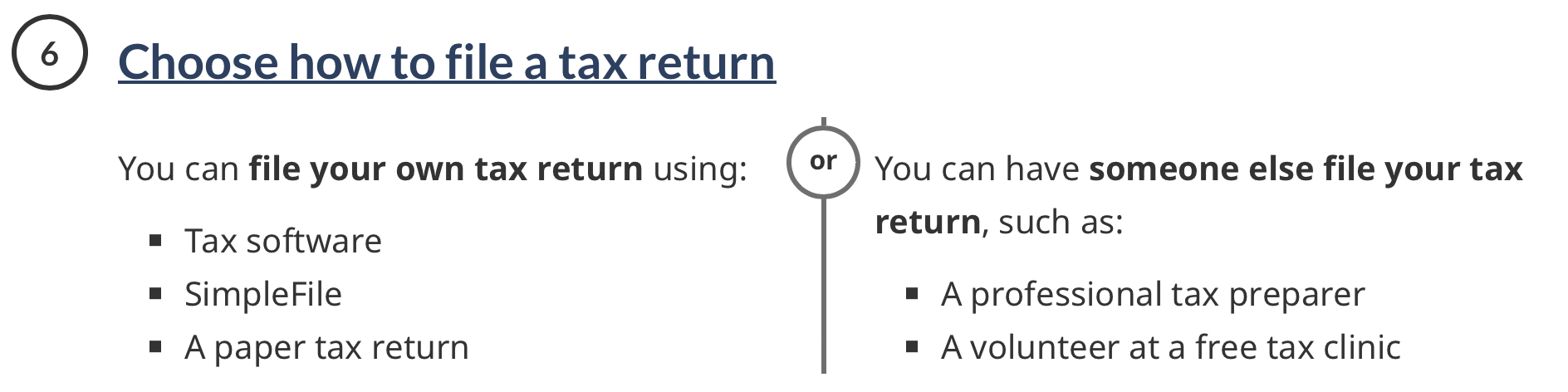 CRA Website: Personal Income Tax - Step 6 of 'Steps to get ready to file a tax return'
For personal tax returns, most Canadians use NETFILE-certified tax software. You (or your tax preparer) prepare your return in the software and submit it directly to CRA electronically. Over 93 percent of personal returns are now filed this way.
For business returns, e-filing is now mandatory for most incorporated businesses (there are a few exceptions). Check CRA's current requirements to confirm what applies to your situation.
If you need to fix a mistake or add information after you have already filed, you do not need to start over. You can use the Change My Return feature inside My Account, or use ReFILE through your tax software. Both options let you amend returns going back up to 10 years. There is no need to mail a paper T1-ADJ or T2-ADJ form anymore, though that option still exists.
🦆 One important timing note. If you plan to use a post-dated payment through the CRA when you file, you need to submit your return at least one week before the deadline. More on that in the next section.
How Do You Pay Online Using CRA My Payment?
 CRA Website: Payments to the CRA
CRA introduced the My Payment service in October 2009. If you lived outside a major urban centre, it was a game changer. No more driving to the bank or mailing cheques and hoping they arrived on time.
This portal lets you pay your business and individual taxes online instantly from your bank account through a secure link with approved Canadian financial institutions. One thing worth knowing right away. When you use My Payment, NO banking information is shared with CRA unless you specifically choose the preauthorized debit option. You simply follow the prompts and make your selections. The banks only share details such as your SIN or business number so they can credit the payment to the correct account.
What can you pay through My Payment?
You can use My Payment to pay a wide range of tax obligations, including GST/HST, payroll deductions, corporate income tax, excise duties and taxes, and individual income tax ... and more.
Online payment method options (and my opinion)
You have several ways to pay.
- Direct bank transfer is available through either CRA's preauthorized debit option or your bank's own tax payment service. This is my personal preference. It is straightforward and reliable.
- Visa Debit has been accepted since 2016 through ATB, CIBC, Scotiabank, RBC, TD, and several credit unions.
- MasterCard Debit was added in 2024 through BMO and a growing list of credit unions.
- Interac Debit was discontinued by CRA and Interac as of September 10, 2024, so that option is no longer available.
A word of caution about debit card payments. If you have multiple bank accounts, be aware that the system may not let you choose which account to pay from. The one time I tried it, it defaulted to the first account associated with the debit card. It may be different now so ... if that matters to you, the direct bank transfer method gives you more control.
Many banks and financial technology companies now offer virtual debit cards for online payments. These are accepted on the My Payment portal. I believe they work similarly to digital wallets in that your actual debit card number is never shared. This, in my opinion, makes using a virtual debit card more secure than entering in your physical debit card details.
One final note on payment methods. CRA NEVER accepts payment by cryptocurrency, gift cards, traveller's cheques, cash by mail, or foreign funds. No exceptions. So if you are being asked to pay CRA using one of these methods, you may be experiencing a cybersecurity event.
My favourite feature: Post-dated preauthorized payment
This feature was added in May 2022 and I genuinely love, love, love it.
When you file your return, you can now set up a post-dated preauthorized payment (PAP) at the same time. You choose the date you want the funds taken from your bank account. The default is five (5) business days from the filing date, but you can choose a later date if you prefer.
This means (1) you no longer have to sign out of My Business / My Account then go sign into My Payment; and (2) you need to file at least a week before any payment deadline to avoid late payment charges. So plan accordingly.
If you make a payment after hours, on a weekend, or on a holiday, it will be credited to your account on the next business day. So that eleven o'clock Tuesday night payment you made from your home office? It counts.
How do you access the My Payment portal?
Using My Payment does not require registration, with one exception. If you want to use CRA's preauthorized debit option, you will need to register first ... it's a process.
Note: CRA does have a webinar called: Easy electronic payment options for business.
Here are three (3) ways to get there.
Option 1: Navigate Through Canada.ca
Go to Canada.ca/en/revenue-agency.html> Payments> Payments CRA> Payments to the CRA> Make a payment> select the right 'path' for your payment method found under 'Ways to pay'.
It is not always prominently displayed on the site, (it's four levels deep in this example) so once you find it, bookmark it. This also helps protect you from accidentally landing on a fraudulent copycat site.
Option 2: Search for It Online
Search 'CRA My Payment' in your browser. Several results will come up. BUT be careful. Make it a habit to verify the URL before clicking. Look for:
- a lock icon(https site) indicating a secure https connection.
- the URL must end in canada.ca with nothing between the word canada and .ca. No exceptions.
Scam sites that mimic CRA are a real and ongoing problem. Take a second to check before you click. And I probably don't need to say this again but I will, bookmark it for easier access next time.
Option 3: File Through My Account or My Business Account (easiest)
This is the method I recommend. Sign in, file your return, and the portal takes you directly to My Payment when you are done. It is seamless. This integrated flow was introduced in May 2022 and it makes the whole process much smoother. I just love it!
The CRA My Payment service is free to use. The post-dated payment option is excellent, but remember the minimum lead time is five (5) business days from the date you file and you must be registered with a My Account or My Business Account to use it.
What About Using Your Bank's Bill Payment System?
Your bank also offers online tax payments to CRA through its bill payment service. This can be a good option in certain situations, but there are a few things to keep in mind.
Some banks charge businesses an administration fee for tax payments because it is a separate system from the standard bill payments system. They may push you toward their own tax filing payment system which existed before CRA's PAP system.
That said, there are real advantages to using your bank's system in some cases. You can set up post-dated payments well in advance, which is valuable if your payments are significant, if an employee handles your filing and payment arrangements, or if you miss a deadline imposed by your accounting platform for automatic payments such as payroll taxes. In many cases, unlike the CRA preauthorized debit system, your bank can process a next-day payment.
For personal tax payments unrelated to your business, your bank's bill payment option works fine. CRA generally considers the payment received on the same or next business day, though it can sometimes take three to five business days to appear in your CRA account.
As a bookkeeper, I have seen the full range of bank payment systems over the years, the good, the bad, and the ugly. The CRA My Payment portal, especially with the post-dated payment feature, is hard to beat for simplicity and control.
Key Takeaways
Filing and paying online is only part of staying in good standing with CRA. Here are a few things to keep in mind.
- If you made a mistake on a return you already filed, or received additional slips after submitting, do not ignore it. Use Change My Return in My Account or ReFILE through your tax software to correct it. Amending your return is easier than ever and covers the last 10 years.
- If you have not yet registered for My Account or My Business Account, now is a good time. The registration process has improved significantly. You no longer have to wait for a security code to arrive by mail. Real-time Document Verification lets you get access immediately.
- Filing and paying online saves time, reduces paper, and makes it easier to stay organized throughout the year. For solopreneurs doing admin in the evenings and on weekends, that convenience is worth a lot. The home office is open. CRA's portal is too.
Common Compliance and Filing Problems Solved
This explainer is one of three covering tax compliance and filing for Canadian solopreneurs.