- A Roadmap To CRA Compliance and Financial Stability
- T2125 Routing Checklist
T2125 Self-Employed Tax Deductions
2026 Canadian Tax Filing Season ... Start Here

By L.Kenway BComm CPB Retired
This is the year you get all your ducks in a row! Start by starting ... and keep it simple. Consistency beats perfection.
Published February 17, 2026 | Update May 27, 2026
WHAT'S IN THIS ARTICLE
Introduction | Start Here | Guardrails | What's New | Next Year
 Safety First ... let's make sure you stay within the guardrails
The T2125 isn't just a tax form you fill out once a year. It's also the backbone of a solid bookkeeping system. Why do I say that? Because the expense categories the Canada Revenue Agency (CRA) uses to assess your business are the same categories you should be using to code your transactions all year long. That's why this page lives under the Categorizing Expenses pillar, not just tax preparation.
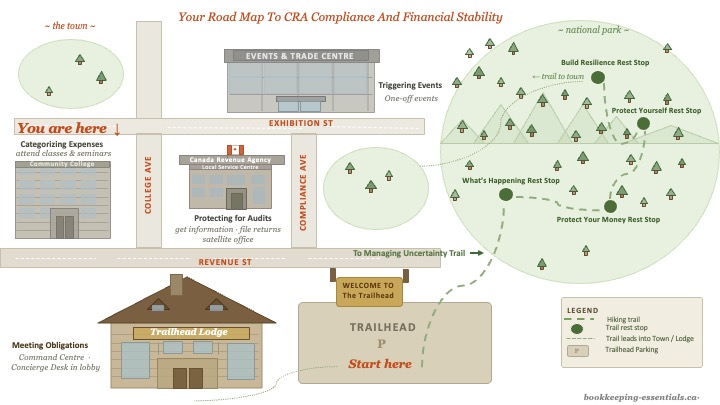 Checking the map. You are at the Community College. This is where you learn CRA's rules for what you can and can't claim ... before you claim it. Categorizing Expenses helps you stay inside the guardrails.
And then tax time arrives. You need to file your T2125 for 2025, and honestly? It can feel like a lot.
The T2125 tax form is the schedule where you report your self-employed business (or professional) income and expenses on your personal T1 tax return. It's how CRA sees what your business earned and what it cost to earn it. This schedule flows through to lines 13499 & 13500 Self-Employment - Business Income on your T1.
Maybe you've got receipts in three different places, you're not sure what's deductible and what's not, and every article you click seems to assume you already know what you're doing. What does your tax preparer even need to do your taxes? ... Or maybe last year was the year you got all your ducks in a row (YAY) and you are ready to file!
Here's the thing. You're not alone in this, and you don't have to figure it all out at once ... even with the deadline looming. (Visiting my site throughout the year helps you build knowledge and confidence when it comes to your business's compliance reporting obligations.)
The purpose of this page is to act like a traffic cop. It routes you to the right next step based on where you are right now. No 47-point checklist. Just ... here's your situation, here's where to go next.
If you need the background first before choosing a path, start by understanding how sole proprietors are taxed in Canada.
Let's figure out where you're starting from.

Start here: which situation are you in?
Choose your path ...
Path A: “My records are in decent shape”
Go to >> T2125 Line-by-Line Guide (Allowable Tax Deductions)
Use this when you’re ready to enter totals and want to understand each line. It walks you through what goes where and why. It also helps you know what to give your tax preparer; as well as what to put in a 'not sure' pile for the tax preparer to decide.
Note: When I say tax preparer, it could be your bookkeeper, your accountant, a tax filing service, or if you have the knowledge, you.
Path B: “I’m behind and overwhelmed”
Go to >> Year-End Tax Rescue Guide (An Easy Tax Filing Organization System)
Start here if you need to gather receipts and build your totals BEFORE touching the form. This guide helps you get organized first, then file.
Need deadline information? I keep the full compliance calendar here >> Small Business Tax Calendar
Path C: "I want to set up my bookkeeping right from the start"
Go to >> T2125 Line-by-Line Guide (Allowable Tax Deductions)
You may notice this is the same destination as Path A. But now you'll use it for a different purpose. You will use the T2125 line-by-line guide to set up your chart of accounts. It shows you exactly what CRA expects so you can code your expenses to the right category as they happen. If you aren't sure where something belongs, go to the guide and find the line you think it belongs to just to double check.
Build the habit now, attach your supporting documents for each transaction, and tax season becomes a totalling exercise ... or if you use software or SaaS (software as a service), running your Profit and Loss report ... not a treasure hunt.
Guardrails (safety first!)
Okay, before you start claiming expenses, let's make sure you know the rules. You don’t have to read all of these today. Use this like a checklist ... scan the images, check off what applies to your business, then click only what you need. It's less taxing (see what I did there?) than wading through a checklist of links.
Still in paralysis mode? If you’re unsure about an expense, click it first. The hardest part is starting ... so start by starting.
This part prevents the most common ‘I didn’t know’ mistakes. It’ll save you time ... promise.
Step 1 (Checklist): Stay Inside CRA's Rules


Now that you know the guardrails, here are the topics people claim most often. You probably won’t need all of them.
Step 2 (Checklist): Review Common T2125 Topics
Check off what applies to your business this year, then use the matching guide to total it up properly.




Not sure where to start? Begin with the Line-by-Line Guide. It gives you the big picture, then you can dive into the specific topics that apply to you.

What’s new for the 2026 tax filing season?
Here's what's confirmed so far (I'll update this if CRA releases more):
- T4002 (Self-employed Business, Professional, Commission, Farming, and Fishing Income Publication) is only online now as far as I can see. You can find the current version here >> CRA T2125 Guide (official page). I'm disappointed that it's February 16, 2026 and the CRA has not updated the guide for the 2025 tax season especially as there have been so many changes made, rescinded, etc. I did find a What's New for 2025 online page that covers EVERYTHING so you have to wade through it.
- As usual, tax bracket indexing adjustments were made. As well, there was a reduction to the lowest federal tax bracket from 15% to 14.5%. It will change to 14% for 2026.
- Automobile deduction limits have been revised. Here are your deduction limit links:
- Vehicle Purchases
- Owned vehicles
- Leased vehicles
- Per kilometre tax-free automobile allowances - The proposed 2025 Capital gains inclusion rate changes were cancelled but the increase the lifetime capital gains exemption (LCGE) was not. Get the details here >> Proposed Capital Gains Inclusion Rate Changes Cancelled in Budget 2025.
- The CRA is placing more emphasis on documenting business expenses. Ensure you have detailed records to backup expenses claimed on the T2125 form.
- The reporting rules for digital platform operators introduced in 2024 are in effect. CRA is now increasing their scrutiny of digital / gig income reporting.
- The CRA is encouraging the self-employed to use certified tax software to complete your T2125 form (and T1 form) to ensure all calculations are accurate with any new rates.
- A reminder that you can no longer phone the CRA and ask for paper copies of tax slips. You must now view and print them through the CRA online portal or contact your employer.
- While not reported on the T2125 (that's Form T776), changes were made to the income tax rules related to short-term rentals after 2023. Learn more >> Changes to rules for eligible deductions from short-term rental income.
I'm retired now, so I don't chase every rumour or draft proposal. What you see here is confirmed and sourced. If something's still 'proposed', I'll say so.
The part that makes next year easier
(One Bookkeeping Habit At A Time)
 You won't get different results if you keep doing the same things
If 2025 felt stressful (you were scrambling for receipts or guessing at totals) here's some good news. You may not need to overhaul your entire back office admin system.
You just need to establish one bookkeeping habit at a time. Each one building on the other. During this chaotic economy we find ourselves in, focus on what you can control. Keeping up with your bookkeeping will put you miles ahead of other businesses, especially if you make your business systems flexible. Why? Because you'll be able to pivot no matter what happens next in our economy.
One bookkeeping habit at a time. That's it.
I built a simple 30-day reset that shows you the loop: what to do, when to do it, and how to make it stick. It's built around a weekly rhythm (Money Mondays to clear your inbox at the start of the week, Treasury Thursdays to manage your cash so you can breathe easier), so you're not thinking about it every single day.
It takes four weeks to establish the system, and then I provide a suggested maintenance routine. Here's an overview of the reset ... you can even choose your technology comfort level!
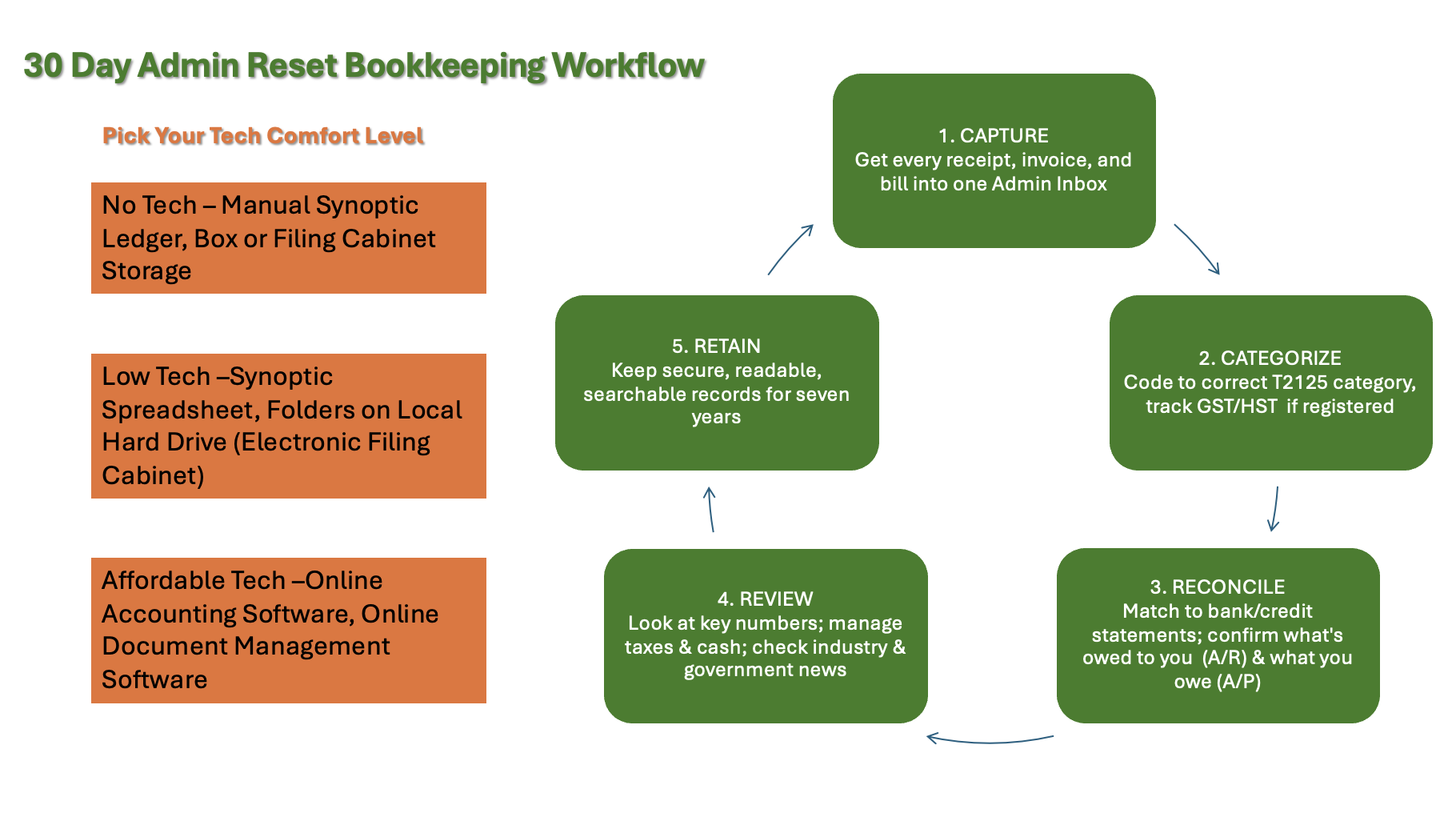 The five-step bookkeeping loop ... simple, repeatable, and designed to fit into your week.
Do just one task today toward meeting your tax compliance obligations. Just one. Then do it again next week. That's how you build resilience ... and how you stop starting from scratch every tax season.
Start here >> 30-Day CRA Admin Reset
It's not about perfection. It's about showing up regularly even when you don't feel like it. Each small habit you build ... no matter how simple ... moves you closer to audit-ready books. The best part? It reduces decision fatigue so you can expend your energy on other parts of your business.
And next February? You'll be in Path A, not Path B.
🦆 Feather This: Consistently showing up beats perfection. You've got this. Breathe.
Back to top