- A Roadmap To CRA Compliance and Financial Stability
- Navigating Change
- Resilient Self-Employed Finances
- CRA-Grade Records System
A CRA-Grade Records System for the Digital Solopreneur

By L.Kenway BComm CPB Retired
This is the year you get all your ducks in a row! Start by starting ... and keep it simple. Consistency beats perfection.
Published May 15, 2026
WHAT’S IN THIS ARTICLE
A. The Foundation | B. Building Your Archive | C. Running Your System | Acronyms Used
BACK TO >> Build Financial Resilience
RELATED >> What is a CRA Audit Trail | Business Record Retention | Data Storage Considerations | How Cloud Bookkeeping Works
 The app is the working system. The exported PDF is the permanent record.
In This Article And On This Site
This page and this site is written for people who are already in business. Articles use standard bookkeeping and tax terms without stopping to define them. If you hit an unfamiliar term, the Terms & Acronyms page is available for your reference. That said, I have included some popular acronyms at the bottom of this page as well.
Don't let unfamiliar language slow you down. Reading this site works the same way as reading the news. The first few times it feels like a lot, but the vocabulary builds faster than you think. Keep coming back and before long it clicks.
A. The Foundation
 You are at the 4th rest stop on the journey to Managing Uncertainty.
Welcome to the Building Resilience Rest Stop!
JUMP TO >> The Problem With “It’s In The App” | What Makes A CRA-Grade System? |The Two-Layer Distinction | What Accountants Actually Preserve
The Problem With "It’s In The App"
Most solopreneurs today do their bookkeeping in software. That is fine. The problem is what happens when the software changes.
In December 2024, Bench Accounting, A Vancouver-based bookkeeping service with over 12,000 clients, shut down with two days' notice. Customers lost access to years of financial records overnight. Yearend was approaching and the deadline was immovable. A solution was found, customers got access back ... but boy did it cause a lot of angst.
The scenario above doesn't happen often. These are the more likely ones that could affect your business. Your bank stops supporting the feed. The app raises its price and you switch. The platform gets acquired and the export format changes. You upgrade your computer and the local install stops working. The company folds. Your subscription lapses for 60 days and you lose access to two years of history.
None of these are hypothetical. They have all happened to real small business owners.
And here is the uncomfortable part. CRA does not care what happened to your app. If you are selected for a review or audit, the obligation to produce records is yours. CRA requires you to keep records for a minimum of six years from the end of the last tax year (which really means seven years) to which they relate. Seven years is a long time for any software subscription to stay stable, affordable, and accessible.
The other risk is subtler. AI hype. New tools promise to categorize everything automatically, connect to every account, and make bookkeeping invisible. Some of them are genuinely useful. But invisible bookkeeping is also unverifiable bookkeeping. When a CRA auditor asks you to trace a deposit to an invoice, “the app handled it” is not an answer that will serve you well.
The fix is not to abandon your software. It is to build an independent archive alongside it ... one that does not depend on any app staying alive, staying affordable, or staying the way it is today.
What makes a records system CRA-grade?
CRA doesn't prescribe a specific system. But it does set the bar your system has to clear. Four benchmarks:
- Readable
Records must be accessible and useable in a format that can actually be opened. That means not locked inside a defunct app or a proprietary backup file no one can read without original software. - Reproducible
The trail has to run in both directions: from your filed return back to source documents, and from any source document back to what was reported. A file trapped in a cancelled subscription is not reproducible. - Backed up
CRA encourages copies stored at a location other than your primary business site. Cloud plus local plus an annual offline copy is a workable version of that standard. - Retained for the required period
Six years from the end of the tax year to which the records relate ... which practically means seven calendar years, since the clocks starts at year-end, not filing date.
Electronic records are explicitly acceptable to CRA, provided they meet all four of these tests. The rest of the article is about building a system that clears every one of them ... without depending on any particular software staying alive to do it.
For full retention rules including keep-forever categories: Business Record Retention
The Two-Layer Distinction
This is the foundation of everything that follows, and it is how accountants, controllers, and auditors think about recordkeeping.
Layer 1: Operational systems. QuickBooks, Xero, Wave, bank feeds, AI tools. These are your working environment. You use them every day to categorize, reconcile, invoice, and run reports. They are enormously useful. But professionals treat them as temporary. Subscriptions end. Platforms pivot. Software gets acquired or sunsetted.
Layer 2: Permanent records. PDFs, CSVs, source documents, exports, and backups that live outside the software. These are your archive. They do not depend on any vendor staying in business. For the most part, they do not require a subscription to open. They are yours.
The key insight that most solopreneurs miss:
- Accountants do not treat accounting software as the permanent record. They treat the software as the working system. The permanent record is the exported, reproducible audit trail.
- CRA explicitly accepts electronic records, provided they remain readable, usable, and reproducible for audit purposes. That word ... reproducible ... is doing a lot of work. A file locked inside a defunct app is not reproducible. A PDF in your Google Drive is.
Building this two-layer system is what this article is about. It is not complicated. It does not require expensive tools. It requires discipline and a clear understanding of what you are trying to preserve ... and why.
What Accountants Preserve
Before we talk about what to save and how, it helps to know what an auditor is actually looking for. Professional accountants structure their records around six layers, and each one serves a specific verification purpose.
- Layer 1: Source documents - receipts, invoices, bank statements, contracts
- Layer 2: Transaction layer - journal entries, general ledger (GL), AP/AR detail
- Layer 3: (Adjusted) trail balance - Year-end account balances before (and after) adjustments
- Layer 4: Financial statements - P&L, balance sheet, GST/HST returns
- Layer 5: Supporting schedules - Depreciation, shareholder loans, payroll summaries
- Layer 6: Metadata - File naming and dating so the trail is followable without you having to reconstruct it from memory.
CRA specifically requires enough detail to reconstruct and verify taxes and income. That means the trail has to run in both directions: from the financial statements back down to the source documents, and from any source document back up to what was reported on your return.
Most solopreneurs have the source documents. Few have the full trail.
B. Building Your Archive
JUMP TO >> The Complete Archive Layer | Avoidable Audit-Risk Habits | Format Rules That Survive Time | Your File Naming System | Where To Store It | The AI Risk Nobody Is Talking About
The Complete Archive Layer
Here is what belongs in your permanent archive. This is a professional-grade list, written for someone doing their own books. You will not need every item in every year. But you should know what each one is and why it matters.
JUMP TO >> Bank & Credit Card Statements | Invoices Issued | Expense Receipts | Year-end Reports | GST/HST and Payroll Reporting | Tax Filings | Accounting Policies
1. Bank and Credit Card Statements
Download your statements as PDFs every month, directly from your financial institution’s online portal. Do not rely on your accounting app to store these. Banks keep online statements accessible for a limited time (often 12 to 18 months) and then they disappear from the portal. By the time CRA asks for a statement from three years ago, it may no longer be available for download.
One PDF per account per month. Saved the day you close the books for that month. This is your proof of payment for every expense and your verification of every deposit. Include payment processor exports here too ... Stripe, PayPal, Square ... downloaded monthly as CSV.
2. Invoices Issued and Sales Records
Every invoice you issue to a client should be saved in a format you can produce on demand.
If you invoice through software, export each invoice as a PDF or set up a routine to export them monthly in a batch.
Sequential invoice numbers matter here. CRA expects to see a complete, unbroken sequence. If you can produce every invoice from number 1001 to 1087 with no gaps, you are telling a consistent story. A gap in the sequence invites questions.
3. Expense Receipts and Source Documents
Keep a digital copy of every receipt (photo, scan, or email confirmation) organized by month. The key is that the copy needs to be readable five years from now. A photo buried in your camera roll, unsorted, is not a records system. A renamed file in a dated folder is.
CRA’s requirements for what makes a legitimate receipt are covered in detail here. The short version. The receipt needs to show who, what, when, and how much. If it does not, write it in the file name.
One important note from the research. Your accounting system should not be the only place receipts live. Software attachments can disappear during migrations. OCR systems fail. When you export your archive, receipts need to travel with it as standalone files ... not just as attachments inside the app.
4. Year-End Financial Reports
This is the category most solopreneurs skip entirely, and it is the one that matters most for proving your numbers.
At the end of each fiscal year (or month-end or quarter-end), export the following from your accounting software and save them as PDFs:
- Profit and Loss (Income Statement): The summary of your income and expenses for the year. This is what feeds your T2125. Save it as a PDF.
- Balance Sheet: What you own and what you owe at year-end. Save it as a PDF.
- Trial Balance: The year-end account balances before any adjustments. This is the document that ties your books together. Many solopreneurs have never heard of it. It is what an accountant checks first when they open a new client’s file. Save it as a PDF.
- General Ledger: Every transaction for the year, in detail, by account. This is the accountant’s trail. If a number on your T2125 is ever questioned, the General Ledger is how you trace it back to the source documents. Save it as both a PDF and a CSV. Two formats. The PDF is for the human auditor. The CSV is for any future system that needs to import or search the data.
- Bank reconciliations: The report that proves your books tie to your bank statements. Export one per account per month, or at minimum at year-end. Save as PDF.
5. GST/HST Returns and Payroll Summaries
Keep a copy of every GST/HST return you file and every payroll summary you produce. If you have employees or contractors, add your T4 and T4A summaries. These are the documents that let CRA cross-reference what you reported on your income tax return against what your other filings imply. Discrepancies between income reported on your T2125 and what your GST filings are one of CRA’s automated triggers. Your archive makes those two numbers reconcilable.
6. Tax Filings and CRA Correspondence
Keep a PDF copy of every tax return you file — T1, T2125, GST/HST returns — for every year. If you use NETFILE, save the confirmation number and the filed return. If a professional prepares your return, ask for a copy.
Keep every piece of CRA correspondence in the same archive: notices of assessment, reassessment letters, review letters, reference numbers. CRA’s default delivery is now your online portal and a notice is considered delivered the day it arrives there, whether you open it or not. Download and save every notice as a PDF when it arrives.
7. Your Chart of Accounts and Accounting Policies
This one is overlooked by almost everyone who does their own books, and it matters more than most people realize.
Your chart of accounts is the list of categories you use to classify every transaction ... revenue, expenses, assets, liabilities. If you have been in business for three years and you switch from Wave to QuickBooks, or from any one system to another, your historical numbers only make sense if someone can see how you categorized things. Without the chart of accounts, future-you cannot explain past-you’s numbers.
It's very important for audit continuity. Otherwise future-you cannot explain historical numbers. Keep a short document called Accounting-Policies.pdf that notes a few key decisions:
- chart of accounts
- depreciation policies - do you use ASPE or CCA?
- revenue recognition rules - are you using cash basis or accrual basis accounting
- GST treatment notes - on invoices? on receipts? using the quick method?
- shareholder loan treatment if applicable
- capitalization thresholds - what your threshold
This document does not need to be long but it should be comprehensive.
The Habits That Create Audit Vulnerability
Know the avoidable audit-risk habits to eliminate
A records system is only as strong as the habits that feed it. You can have the right folder structure, the right file naming convention, and the right storage strategy ... and still end up with records that won’t hold up under CRA scrutiny, because of what happened upstream.
These are the three workflow habits most likely to create gaps in an otherwise solid system. They are avoidable. They are common. And unlike the risks covered in What Triggers Tax Audits in Canada ... which are about how CRA selects returns ... these are entirely within your control.
What Does Contemporaneous Mean?
Contemporaneous means created in the ordinary course of business before there is reason to be defensive about them.
CRA does not require that every record be created at the exact moment of a transaction. A reconciliation completed at period-end, books brought to a bookkeeper at year-end and posted before you're return is filed, a management note written before you file, a description on a meal receipt with clients written right at the table stating the business discussed, who was present ... all of these meet the standard. The records were created as part of running your business, not in response to CRA scrutiny.
A problem arises specifically when CRA makes contact. If gaps exist in your records at that point, anything created or reconstructed after CRA reaches out carries a credibility problem. Not necessarily because it is wrong but because there is now a reason to question whether it reflects what actually happened or what you need it to say.
Contemporaneous records carry weight because they reflect what you knew and what you decided at the time. A note on a transaction completed in February for February is evidence. The same note completed in November the next year, when CRA is asking questions, is an explanation ... and those are not the same thing. CRA and the Tax Court treats them differently.
Throughout this section, when you see the word contemporaneous, that is what it means: made then, not now.
1. Posting Transactions Without Source Documents Attached
The Habit
Capturing documents and categorizing transactions as two separate steps, with attachment deferred to 'later'. Later becomes never. By year-end, you have a clean set of books and a pile of unattached receipts that no longer match cleanly to specific transactions.
The Risk:
A transaction in your GL without a source document is a number with no proof. The entry tells CRA what you claimed. The source document tells them why it was a legitimate business expense. Without the attachment, you have half a record ... and half a record is not a defensible one.
The Fix
Attach the source document at the time of posting, every transaction, every period. What that means in practice depends on your system:
- If you use SaaS or desktop bookkeeping software (QBO, QBD, Xero, Wave, Sage, and similar) ... attach the source document digitally to the transaction before you close it. Most current bookkeeping software supports document attachment on every transaction. Use it.
For example
QBO also has its own native document capture feature. You can send source documents directly into QBO by email, mobile app, or upload. QBO processes the document using OCR, you review and confirm the details. Saving and closing the source document posts the transaction in QBO with the document attached. A match then appears in your bank feed for reconciliation.
It is a tidy workflow if you are already committed to QBO as your long-term platform. That last phrase is worth contemplating. QBO’s native capture stores your documents inside QBO only ... they are not independently archived outside the app. The feature has also gone through several iterations over the years, and earlier versions were discontinued, taking documents with them. If you are still evaluating whether QBO is your permanent home, or if platform independence matters to you, a dedicated DMS like LedgerDocs keeps your source documents in a separate system you control ... and makes it considerably easier to leave QBO if you ever want to.
- If you are using LedgerDocs (or any DMS) and QBO together, attachment happens automatically when you hit send ... the source document travels with the transaction to QBO and is attached to the bookkeeping entry. The DMS stores the original documents while the SaaS platform attaches them to the bookkeeping transaction.
- If you use a synoptic ledger or an Excel-based system ... the discipline is the same, but attachment means a well-organized parallel filing system like in the old days. Your source documents live in dated folders (physical or digital), and each entry in your ledger carries a cross-reference ... a transaction number, a date-vendor notation, or a document code ... that points directly to the corresponding document in the folder. The ledger entry and the source document need to be findable from each other. That cross-reference is the manual equivalent of a digital attachment, and it needs to be there at the time of posting, not added later.
2. Inconsistent Expense Categorization
The Habit
Changing how expenses are categorized from period to period ... or year to year ... without a deliberate reason. Sometimes it is a different decision in a busy month. Sometimes it is a chart of accounts that does not map cleanly to the T2125, so judgment calls vary. Either way, the result is inconsistency that shows up in your filings.
The Risk
CRA’s risk-scoring systems compare your expense ratios against industrybenchmarks and your own prior-year filings. A category that shifts significantly from one year to the next raises your risk score without any underlying change in your actual business activity. Inconsistency also creates year-end reclassification work that did not need to exist.
The Fix
Start with a chart of accounts that maps to your T2125, and apply it consistently every period. Consistency matters. An expense consistently applied to the wrong category is easier to explain and correct than six months of posting it to different accounts.
QBO and other bookkeeping programs make it easy to do by showing you where you categorized this transaction last time. Also, there is a spot in the setup where you can set the default account for a supplier.
If you make a deliberate categorization change ... a new expense type, a correction to a prior approach ... document it in your period-end management notes. A contemporaneous note explaining the change is far more credible to a CRA reviewer than a reclassification that appears without explanation.
3. Leaving Reconciliations Until Year-End
The Habit
Deferring bank and credit card reconciliations until year-end (or until tax time) rather than closing them out at the end of each period. This often happens because the books feel current when transactions are being posted regularly.
The Risk
Small errors compound. A duplicate entry in February is still there in December. A missed transaction in April creates a variance that takes hours to trace. A bank error that would have been caught in March goes unchallenged for nine months.
The Fix
Reconcile every account ... chequing, savings if used for business, every business credit card ... at the close of every period. Monthly is the standard. Quarterly is acceptable if your weekly habits are solid and your transaction volume is low. Download the reconciliation report in PDF format and file it for each account with your period records as soon as it is produced.
Format Rules That Survive Time
The research document on professional archiving is explicit about this, and it maps to a useful reference table. Here it is translated for a solopreneur context.
- Financial reports and statements: best format is PDF because it is an open standard, universally readable, and hard to silently alter
- Transaction date and GL exports: best format is CSV because it is plain text, opens in any spreadsheet, and is importable anywhere
- Receipts and scanned documents: best format is PDF or JPG because it is widely supported and there is no proprietary dependency
- Annual archive package: best format is ZIP because it compresses everything into one portable file
There are two principles behind this list:
- PDF is evidence for humans. An auditor, an accountant, a future version of yourself ... anyone can open a PDF in 2031 on whatever device exists then. The same cannot be said for proprietary accounting backup files, which are only readable by the software that created them.
- CSV is evidence for future systems. CRA's IC05-1R1 Eletronic Record Keeping explicitly mentions “non-proprietary, commonly used data interchange formats” when describing acceptable electronic records. CSV is one of the safest long-term formats in existence. If your accounting software disappears, a CSV export of your General Ledger can still be imported into whatever replaces it. The other thing I like about it is you can look stuff up through using filters.
What not to rely on exclusively
Do not rely exclusively on proprietary accounting backups, app-specific databases, AI-generated summaries, or undocumented automations. These all share the same vulnerability ... they require the original system to remain functional and accessible to be useful.
Screenshots are not records
A screenshot of your bank balance is not a bank statement. A screenshot of an invoice in your accounting app is not a source document. Screenshots have no metadata, no audit trail, and no guarantee of completeness. Always export from the source.
Your File Naming System
Start the way you intend to end. A consistent naming convention costs nothing to implement and saves hours of searching years later. One convention is:
- YYYY-MM-DD Source Account-or-Type DocumentType
Everyday Examples:
- 2026-03-31 BMO Chq Stmt
- 2026-03-31 TD Visa Stmt
- 2026-03-31 QBO P&L Annual
- 2026-03-31 QBO BS Annual
- 2026-12-31 QBO GL Annual
- 2026-12-31 QBO TB YE
- 2026-12-31 QBO BankRec BMO-Chq
- 2026-04-30 Stripe Sales Transactions
- 2026-02-15 Rogers Cell Bill
- 2026-12-31 CRA T1 Filed
- 2026-12-31 CRA GST Return-Q4
- 2026-12-31 Internal COA Annual
Where To Store It
Independent copies. That is the whole principle. Your archive cannot live in only one place, and it cannot live only inside your accounting app.
A practical three-location approach:
- Cloud storage as your primary archive. Google Drive, OneDrive, or Dropbox ... pick one and build your Financial Archive folder there. This gives you access from any device, automatic versioning, and offsite protection.
- A local copy as your secondary archive. An external hard drive or SSD. Copy your archive to it at minimum quarterly. Cloud services have had outages, account lockouts, and in rare cases data loss. A local copy is your insurance.
- An annual offline backup. Once a year, when you create your annual permanent snapshot (covered in the next section), copy it to a second external drive or USB and store it somewhere other than your primary workspace. A drawer at a family member’s house. A fireproof box. Anywhere that is not the same physical location as your primary drive.
This is a workable version of the professional 3-2-2 backup principle: three copies of your data, in two different storage types, with two stored off-site. Cloud plus local plus annual offline is an approximation most solopreneurs can actually maintain.
What "backup" actually means
A backup is not just a copy that exists. It is a copy you have verified you can restore. Many people have backups they have never tested. When the moment comes to open a file from three years ago, they discover the backup is corrupted, the folder structure changed, or the files are in a format they can no longer open. The backup existed. It just did not work.
The AI Risk Nobody Is Talking About
AI bookkeeping tools introduce a risk that did not exist five years ago ... silent retroactive mutation. This is when a model update changes how it categorizes historical data without notifying you. A transaction coded as Office Supplies in January may be silently recoded as Equipment in March when the AI updates its logic.
For daily working purposes, this is a minor nuisance. For a CRA audit, it is a serious problem. If an auditor compares your filed return to what your books say today, and those numbers do not match because the AI revised history, you have no clean explanation.
Think of it this way
AI can help you produce books. But source evidence proves books. The AI’s output is a working document. The source evidence is the permanent record.
The practical protection for most solopreneurs is your year-end snapshot. Locking what your books said at the time of filing. That's covered in the Annual Immutable Snapshot section below.
If you use AI Agents actively, there's an additional layer worth knowing about. I'll use QBO as an example. QBO has always allowed you to modify prior periods. It would ask you whether you want the change to apply going forward or retroactively. My personal rule has always been if I reported the information to CRA, you not change retroactively. You correct it going forward only. If you haven't closed year-end, adjusting journal entries to reclassify transactions is also available. I'm not sure how QBO has programmed their new AI Agents but I would expect them to follow the same closed-period logic and prompt before changing historical data. Something worth verifying with your specific tool.
For those who want the deeper protection, you can manually export bank feed transactions before AI categorization is applied or download transactions directly from you bank on a regular basis. This gives you a permanent record of original data before AI touches it. For most solopreneurs this is overkill. With AI Agents becoming standard in SaaS (software as a service) subscriptions, it's worth knowing the option exists.
C. Running Your System
JUMP TO >> CRA-Records Grade Workflow | The One Task Most People Skip | Feeding Your Archive | CRA-Records Grade Checklist | Solo CEO Move
Your CRA-Grade Records Workflow
The Operating Rhythm That Feeds Your Annual Snapshot
The system described in this article comes down to five moments and three locations. Here's what it looks like in practice.
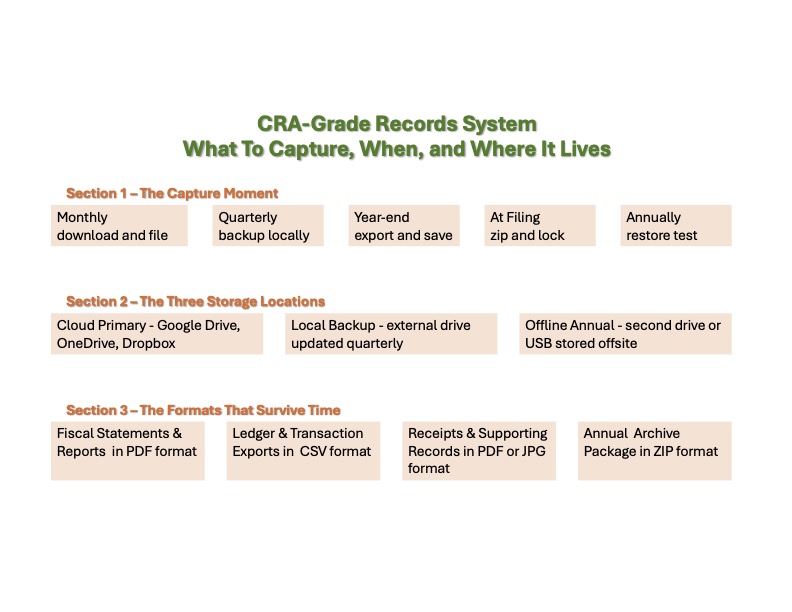 CRA-Grade Records System Workflow
The One Annual Task Most People Skip
Once a year (tax time is a natural trigger) do a restore test.
It takes fifteen minutes. Open your Financial Archive. Navigate to the folder from two years ago. Pick three files at random: a bank statement, a financial report, and a tax return. Open each one. Can you read them? Are they complete? Could a CRA auditor sitting across the table from you follow the trail?
If yes, your archive is working. If no, you have found the gap now, while you still have time to fix it.
Ask yourself one more question while you are there. If you had to hand this folder to a CRA auditor tomorrow (or to your accountant) could they follow your trail without asking you a single question? Clear folder names, consistent file naming, complete records by year.
This is what you are building.
During a CRA audit, the ideal position to be in is this: “Here is the exact year-end archive, unchanged since filing.” You open the folder. Everything is there. Statements, ledger, source documents, reconciliations, tax filings. The auditor can follow the trail from the filed return all the way back to the source documents ... without you having to reconstruct anything from memory. It's an ideal position but it is not the ideal audit strategy.
🦆 Duck Wisdom
The principle of least disclosure is the ideal strategy during an audit. So NEVER give a CRA auditor open access to your file archives. It encourages a fishing expenditure and no context or explanations which leads to an auditor making assumptions.
Feeding Your Year Round Archive
Immutable means something is incapable of being changed, modified, or altered over time. That's what you are aiming for. Verifiable means you have tested that you can restore the backup copy.
You feed your working archive all year with monthly, quarterly and then locking it after you've fed it the year-end package. At the end of each fiscal year, after your books are closed and your return is filed, create one package that captures everything for that year ... and then never alter it.
Example
The folder or zip file name tells the story:
- 2025-FINAL-BOOKS
Inside it you'll find:
- Financial-Statements
- 2025-12-31 QBO P&L Annual.pdf
- 2025-12-31 QBO BS Annual.pdf
- 2025-12-31 QBO ATB YE.pdf
- 2025-12-31 QBO GL Annual.pdf
- 2025-12-31 QBO GL Annual.csv
[Monthly and quarterly reporting too if applicable] - Bank-Statements
[12 monthly PDFs per account using the naming convention] - Receipts
[All receipts filed by naming convention for the year] - Invoices-Issued
[All client invoices filed by naming convention for the year] - GST-Payroll
- 2025-12-31 CRA GST Return-Q4.pdf
[Quarterly returns, payroll summaries if applicable] - Tax-Filings
- 2025-12-31 CRA T1 Filed.pdf
- 2025-12-31 CRA T2125 Filed.pdf - Policies
- 2025-12-31 Internal COA Annual.pdf
- 2025-12-31 Internal AccountingPolicies.pdf
Once assembled, this package does not get edited. Append-only means if you find an error later, you document the correction separately. You do NOT reach back into the closed year and change it. This creates defensible history. A file with a consistent creation date and no modification history is far more credible than one that has been edited repeatedly.
Copy this folder to your cloud, your local drive, and your annual offline backup. It is your year’s work in one place, readable by anyone, without any software required.
Your CRA-Grade Records Checklist
Once you've created your YYYY-Final-Books folder structure explained earlier, here's what to put in it and when.
Monthly
- Bank and credit card statements downloaded as PDFs
- Payment processor exports downloaded as CSVs (Stripe, PayPal, Square)
- Expense receipts with YYYY-MM-DD naming convention
- Invoices issued saved as PDFs with sequential numbering
Quarterly
- Local drive backup updated
- Bank reconciliations exported
Year-end
- P&L, Balance Sheet, Trial Balance exported as PDFs
- General Ledger exported as both PDF and CSV
- GST/HST return and payroll summaries saved
- Tax filings and CRA notice of assessments saved
- Chart of accounts and accounting policies document updated
At Filing
- Immutable snapshot created ... zipped, labelled YYY-Final_Books, stored in all three locations
- Snapshot verified ... do not alter after this point
Annually
- Restore test completed ... three files opened from two years ago
- Could CRA auditor follow this trail without asking a single question?
🦆 Solo CEO Move (this week)
Open your cloud storage and create a folder called Financial Archive . Inside it, create a subfolder for the current year. Create subfolders inside that for Bank Statements, Receipts, Invoices Issued, and Year-End. Put this month’s bank statement PDF in the Bank Statements folder, named with the YYYY-MM-DD convention. Create a Naming-Key.txt file in the root with your abbreviation decisions. That is the whole task. The system builds itself one file at a time from here.
Acronyms Used In This Article
These are the acronyms used specifically on this page. If I missed any, please check the Site Glossary.
AI: Artificial Intelligence
AP: Accounts Payable
API: Application Programming Interface
AR: Accounts Receivable
ASPE: Accounting Standards For Private Enterprises
BS: Balance Sheet Statement
CCA: Capital Cost Allowance
CHQ: Chequing
CRA: Canada Revenue Agency
COA: Chart of Accounts
CSV: Comma separated value
GL: General Ledger
GST: Goods and Services Tax
HST: Harmonized Sales Tax
JPG or JPEG: Joint Photographic Experts Group
P&L: Profit and Loss Statement, Income Statement
PDF: Portable Document Format
QBO: QuickBooks Online
T1: Income Tax And Benefit Return tax form
T2125: Statement of Business or Professional Activities tax form
T4: Statement of Remuneration Paid tax slip
T4A: Statement of Pension, Retirement, Annuity, and Other Income tax slip
(A)TB: (Adjusted) Trial Balance
XLSX: Microsoft Excel Open XML Spreadsheet
YE: Yearend
Compliance Obligation Articles
Small Business Bookkeeping | Basic Bookkeeping
Small business bookkeeping is an age old system designed to keep financial records in an organized way. Technology has made it easier than ever to learn.
The Solo CRA-Ready Workflow | Gather Process Results
A three-step bookkeeping workflow for Canadian solopreneurs. How Gather Process Results keeps your books current and CRA-ready.